

You spent weeks building your product. You set up your UK company. You finally integrated Stripe and started accepting payments. Then one morning, you check your dashboard and see it — “Payouts on hold.”
No warning. No explanation you can understand. Just a frozen account and customers who’ve already paid you money you can’t access.
Here’s what most founders don’t realise: Stripe’s AI bots aren’t reviewing your product descriptions. They’re auditing your website’s footer. One missing policy page, one absent company number, one unclear refund policy — and Stripe’s automated risk system flags your entire account as high-risk.
We’ve helped over 10,000 founders from 100+ countries set up their UK businesses, and Stripe website audit issues are one of the most common problems we see. This guide breaks down exactly what Stripe’s bots look for, why accounts get suspended, and how to make sure yours passes every check.
🚨 Want to check your website right now?
Don’t wait for Stripe to suspend your account. Our free Stripe Compliance Scanner checks your website against 20+ of Stripe’s strictest requirements in under 60 seconds.
👉 Scan Your Website Now — FreeWhat Stripe’s AI Crawlers Actually Look For
When you connect Stripe to your business, their automated compliance system scans your entire website. This isn’t a one-time check — Stripe continuously monitors your site for what they call “trust signals.”
Think of it like a digital due diligence process. Stripe needs to prove to card networks (Visa, Mastercard) and regulators that every business using their platform is legitimate. If your website doesn’t meet their standards, their system flags you automatically.
Here’s what their crawlers are scanning for:
The Stripe Website Checklist
According to Stripe’s own documentation, your website must include:
- A clear description of what you sell — Products or services must be obvious to a first-time visitor. Vague descriptions trigger red flags.
- A refund and return policy — This is the number one reason accounts get flagged. Even if you sell digital products, you need a refund policy that explains what happens if a customer wants their money back.
- Terms of service — Your legal terms governing the use of your product or service.
- Privacy policy — How you collect, use, and protect customer data. This is also a legal requirement under UK GDPR.
- Contact information — A real way for customers to reach you. An email address at minimum, ideally a phone number or contact form too.
- Your registered business address — For UK companies, this means the address listed at Companies House. A PO Box or vague location won’t cut it.
- Your company registration number — Your Companies House number proves you’re a real, registered business.
- Accurate billing descriptors — What shows up on your customer’s bank statement must match your business name and website.
If any of these are missing or unclear, Stripe’s system doesn’t send you a polite reminder. It restricts your account first and asks questions later.
Why a “High-Risk” Flag Can Kill Your Cash Flow Overnight
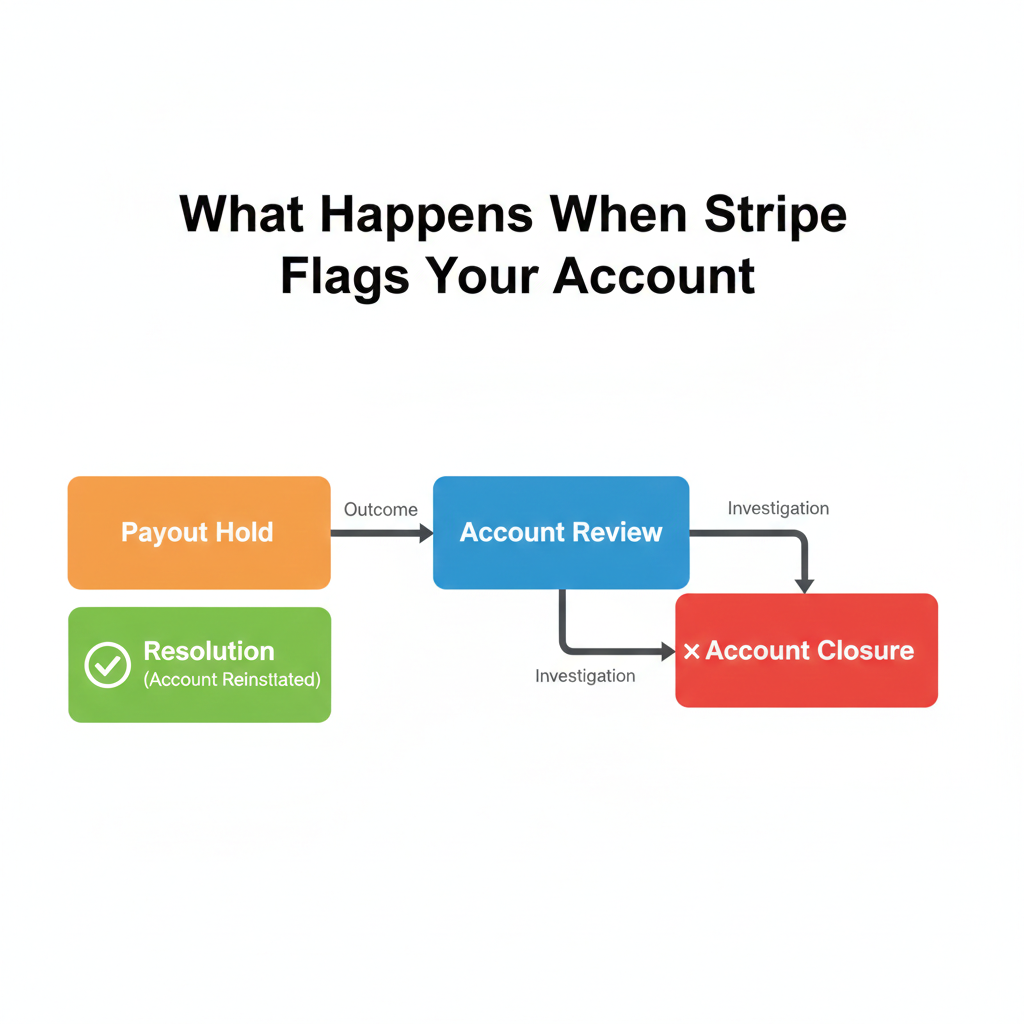
When Stripe’s system flags your account, the consequences hit immediately. Here’s the typical sequence:
Step 1: Payout hold. Your money sits in Stripe but doesn’t reach your bank account. This can happen with no notice.
Step 2: Review request. Stripe asks for additional documentation — business registration, proof of address, website screenshots, sometimes even financial statements.
Step 3: Extended review. While Stripe reviews your case (which can take days or weeks), you still can’t access your funds. New payments may also be blocked.
Step 4: Account restriction or termination. In the worst case, Stripe closes your account entirely and holds funds for up to 90 days to cover potential chargebacks.
For a small business or startup, this isn’t just inconvenient — it’s potentially fatal. If you’re relying on Stripe for your revenue, a payout suspension means you can’t pay suppliers, can’t cover operating costs, and can’t fulfil orders. Your customers are paying you, but you’re not receiving the money.
What Triggers a High-Risk Flag?
New for 2026: Stripe and the Visa Acquirer Monitoring Program (VAMP)
In 2026, passing a Stripe compliance check is harder due to stricter card network rules like the updated Visa Acquirer Monitoring Program (VAMP). Stripe is under immense pressure to keep dispute rates far below 0.9%. If your website lacks clear refund policies or accurate billing descriptors, Stripe’s AI will flag you to avoid network penalties. Meeting these strict Stripe verification requirements upfront is no longer optional
Beyond missing website policies, Stripe’s risk system watches for:
- Sudden spikes in transaction volume — If you go from processing £500/month to £10,000/month overnight, expect scrutiny.
- High chargeback rates — If more than 1% of your transactions result in disputes, Stripe takes notice.
- Restricted business categories — Certain industries face extra scrutiny by default (nutraceuticals, digital goods, subscription services with free trials).
- Mismatched information — If your company name on Stripe doesn’t match Companies House records, or your website domain doesn’t match your business details.
- Missing or outdated policies — Policies that were there during signup but later removed or moved to a different URL.
The 10-Point Stripe Website Audit Checklist
Tired of checking this manually? Run a free Stripe compliance check.
Let our AI tool scan your website for missing policies, broken links, and hidden red flags before Stripe’s bots do.
Launch the Free Scanner1. Refund & Return Policy (Critical)
Your refund policy must be:
- Easily findable (linked in your website footer on every page)
- Written in clear, simple language
- Specific about timeframes (e.g., “14-day refund window”)
- Clear about the refund process (how customers request one, how long it takes)
- Honest about non-refundable items or services
Pro tip: Even if your policy is “no refunds,” you still need to state that clearly. The worst thing is having no policy at all.
2. Terms of Service
Include:
- What your service or product does
- User responsibilities
- Payment terms
- Limitation of liability
- Governing law (UK law for UK companies)
3. Privacy Policy
Under UK GDPR, this isn’t optional. Your privacy policy must cover:
- What personal data you collect
- Why you collect it
- How you store and protect it
- How users can request deletion of their data
- Your Data Protection Officer contact (if applicable)
4. Clear Product/Service Descriptions
Every product or service page should make it immediately obvious:
- What the customer is buying
- What they’ll receive
- How and when they’ll receive it
- The price (including VAT if applicable)
5. Contact Information
Display prominently:
- Business email address
- Phone number or contact form
- Physical business address (your UK registered address)
- Response time expectations
6. Company Registration Details
In your website footer, include:
- Company name (as registered with Companies House)
- Company number
- Registered office address
- VAT number (if VAT registered)
This is actually a legal requirement for UK limited companies under the Companies Act 2006, not just a Stripe requirement.
7. Shipping & Delivery Policy (For Physical Products)
If you sell physical goods, include:
- Estimated delivery timeframes
- Shipping costs
- International shipping availability
- What happens if a package is lost or damaged
8. Billing Descriptor Match
Check that your Stripe billing descriptor (what appears on customer bank statements) matches:
- Your business name or trading name
- Your website URL
- Something a customer would recognise
A random string of letters or a completely different name from your website will confuse customers and lead to chargebacks.
9. SSL Certificate
Your entire website must use HTTPS (the padlock icon in the browser). Stripe won’t even let you complete integration without this, but make sure it’s active on every page, not just the checkout.
10. Consistent Business Information
Cross-check that these details match everywhere:
- Companies House registration
- Stripe account details
- Website footer
- Your bank account name
- Your domain registration (WHOIS)
Any mismatch between these is a red flag for Stripe’s system.
How International Founders Get This Wrong (And How to Fix It)
If you’re running a UK company from outside the UK — which many of our clients do — there are extra challenges with Stripe compliance:
The Address Problem
Stripe expects to see a legitimate UK business address on your website. If you registered your company with a formation agent’s address but don’t display it on your website, that’s a gap Stripe’s crawlers will notice.
The fix: Use a professional registered office address and display it properly in your footer. This is where a service like Launchese’s packages connect directly — you get a real UK registered office address that satisfies both Companies House requirements and Stripe’s website audit.
The Banking Mismatch
If your Stripe account is connected to a bank account in a different name or country than your registered company, Stripe may flag this as suspicious.
The fix: Ensure your UK business bank account matches your Companies House registration. If you’re struggling to get a UK bank account as a non-resident, that’s something Launchese can help with — our packages include banking setup guidance, and we know which banks work for international founders (subject to eligibility).
The “Ghost Website” Problem
Some founders set up a minimal landing page just to pass Stripe’s initial check, then never update it. Stripe’s system re-checks periodically. If your website goes stale, loses its SSL certificate, or pages start returning 404 errors, your account can get flagged months after initial approval.
The fix: Keep your website maintained. Update your policies at least once a year. Make sure all links work.
What to Do If Your Stripe Account Is Already Suspended
If you’re reading this because you’ve already been flagged, here’s your action plan:
- Don’t panic, but act fast. Stripe gives you a window to respond. Use it.
- Read the Stripe notification carefully. They usually tell you what’s missing or what triggered the review.
- Fix your website first. If you aren’t sure how to code the fixes, read our complete [step-by-step guide on how to fix Stripe website errors ->]
- Gather your documents. Stripe may ask for: Certificate of Incorporation, proof of registered address, bank statements, photo ID of directors.
- Respond clearly and professionally. Acknowledge the issue, explain what you’ve fixed, and provide all requested documents.
- Set up a backup payment processor. While you resolve the Stripe issue, consider having a second option ready so your business doesn’t stop completely.
Frequently Asked Questions
Can Stripe close my account without warning?
Yes. Stripe’s terms allow them to suspend or close accounts at their discretion. In practice, most suspensions come with a notification and a request for information, but payout holds can happen immediately while the review is ongoing. The best defence is making sure your website passes their checks before any issues arise.
Do I need a refund policy if I sell digital products?
Absolutely. Every business using Stripe needs a refund policy, regardless of what you sell. For digital products, your policy should explain whether refunds are available, under what circumstances, and how customers can request one. Even a clear “all sales are final” policy is better than no policy.
Does Stripe check my website regularly or just during signup?
Stripe’s automated systems continuously monitor merchant websites. This means changes you make after initial approval — like removing policy pages, changing your business description, or letting your SSL certificate expire — can trigger a new review at any time.
What’s the difference between a payout hold and an account closure?
A payout hold means your account is still active but Stripe is holding your funds pending review. You may still be able to accept new payments. An account closure is more severe — Stripe terminates your ability to process payments entirely and may hold funds for up to 90 days to cover potential chargebacks or refunds.
Can Launchese help me set up Stripe properly?
Launchese helps international founders get their UK business fully set up — from company formation and registered address to banking and compliance. Having your company properly registered, a legitimate UK address displayed on your website, and matching business details across all platforms is exactly what Stripe’s system wants to see. Get started with Launchese to make sure your business is Stripe-ready from day one.
Get Your Business Stripe-Ready from Day One
The easiest way to avoid Stripe compliance problems is to get everything right from the start. That means:
- A properly registered UK company with a real registered office address
- All required website policies in place before you even connect Stripe
- Matching business information across Companies House, your website, your bank, and Stripe
- A professional setup that shows card networks and regulators your business is legitimate
This is exactly what Launchese does for thousands of international founders. We handle company formation, registered office addresses, business banking setup (subject to eligibility), and ongoing compliance — so your UK business passes every check, including Stripe’s.
Compare our packages to find the right fit, or if you need dedicated Stripe help, check out our Stripe Consulting service.
→ Start your UK company with Launchese
This article is for general information purposes only and does not constitute legal, tax, or financial advice. Stripe’s requirements may change — always check Stripe’s official documentation for the most current guidelines. Bank account and payment processor approvals are subject to eligibility and the provider’s own requirements.